- Products
- Air Compressors & Air Tools
- Climate Control
- Compaction Equipment
- Concrete Cutting Tools & Equipment
- Concrete and Masonry
- Demolition & Excavation
- Electrical & Mechanical
- Fasteners and Anchoring Adhesives
- Floor Protection
- Generators and Welders
- Hand Tools
- Heaters
- Janitorial and Office Supplies
- Jobsite Protection
- Ladders & Storage
- Lighting & Lighting Accessories
- Man Lifts
- Material Handling Equipment
- Power Tools
- Pressure Washers & Pumps
- Safety Gear
- Safety Products
- Saws
- Surface Preparation
- SEASONAL PRODUCTS
- Rentals
- Air Compressor and Air Tool Rentals
- Climate Control Rental
- Compaction Rentals
- Concrete Equipment Rentals
- Demolition & Excavation Equipment Rentals
- Concrete Floor Grinder Rentals
- General Construction Equipment Rentals
- Generator Rentals and Welder Rentals
- Heater Rentals
- Light Tower Rentals
- Man Lift Rentals in Massachusetts and Rhode Island
- Material Handling Equipment Rentals
- Pressure Washer & Pump Rentals
- Saw Rentals in New England
- SEASONAL PRODUCTS
- Products
- Air Compressors & Air Tools
- Climate Control
- Compaction Equipment
- Concrete Cutting Tools & Equipment
- Demolition & Excavation
- Electrical & Mechanical
- Floor Protection
- Generators and Welders
- Construction Heaters
- Construction Ladders, Staging, & Storage
- Construction Lighting
- Man Lifts
- Material Handling Equipment
- Industrial Janitorial and Office Supplies
- Pressure Washers & Pumps
- Construction Safety Products
- Construction Safety Gear
- Surface Preparation
- Building Protection
- Diesel Accessories
- Zero Emissions
- Rentals
- Air Compressor and Air Tool Rentals
- Climate Control Rental
- Compaction Rentals
- Concrete Equipment Rental
- Demolition & Excavation Equipment Rental
- General Construction Equipment Rental
- Generator Rentals and Welder Rentals
- Construction Heaters Rental
- Light Tower Rentals
- Man Lift Rentals
- Material Handling Equipment Rental
- Pressure Washer & Pump Rentals
- Saw Rentals in New England
- Concrete Floor Grinder Rentals
- Zero Emissions Rentals
- Repairs & Used
- Parts
- Blog
- Services
- Resources
- About Us
- Contact Us
Sales & Rental of Construction | Industrial Equipment & Supplies

What is the Best KVM Switch for Your Business Needs?
In today’s fast-paced business environment, choosing the right KVM Switch is crucial for efficient operations. According to a report by MarketsandMarkets, the global KVM Switch market is expected to reach $1.4 billion by 2026, growing at a CAGR of 5.2%. This statistic highlights the increasing reliance on KVM technology as organizations strive for seamless management of multiple machines.
KVM Switches allow users to control several computers from a single keyboard, video monitor, and mouse. "The right KVM Switch can simplify workflows and enhance productivity," states John Smith, a leading expert in the field of IT infrastructure. However, selecting the ideal switch can be challenging. Businesses often struggle with key factors such as scalability, compatibility, and cost. Evaluating these elements is essential to avoid poor investment.
As we explore the best KVM Switch options for your needs, it's vital to consider the specific requirements of your business. Are your current systems scalable? Are they user-friendly? The answers are foundational for making informed decisions. Remember, a KVM Switch is an investment in your operational efficiency.
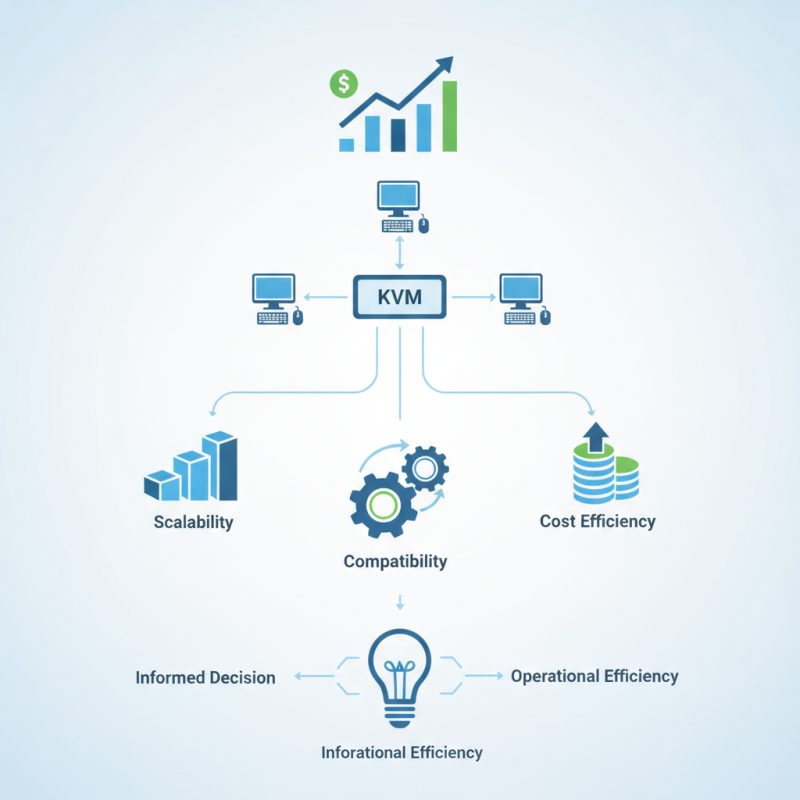
Table of Contents [Hide]
Understanding KVM Switches and Their Benefits for Businesses
KVM switches are essential tools for optimizing IT infrastructures in businesses. By allowing control of multiple computers using one keyboard, video monitor, and mouse, they streamline operations. This efficiency can lead to reduced costs. According to a report by Research and Markets, the global KVM switch market is expected to grow significantly, reaching approximately $3.1 billion by 2025. This growth highlights the importance of these devices in modern work environments.
Understanding the specific needs of your business is critical. Not all KVM switches are suitable for every scenario. Variables like the number of computers, desired video resolution, and remote access capabilities matter. Some businesses may overlook these details, potentially leading to underperforming systems. The flexibility offered by advanced USB KVM switches is noteworthy. They allow seamless switching between servers, which can enhance productivity and reduce downtime.
However, implementing a KVM switch isn't without challenges. Compatibility issues may arise with different operating systems or hardware configurations. IT teams must conduct thorough assessments before integration. Regular maintenance and updates are also necessary for optimal performance. Neglecting these tasks can lead to security vulnerabilities and system failures.

© Copyright - Pro Tool & Supply - Site by SVM E-Marketing Solutions - Sitemap
- Privacy policy